
In-app subscriptions are recurring digital purchases that grant a time-limited entitlement, and both Apple and Google require their own billing systems to process them. Apple runs this through StoreKit and App Store Connect; Google runs it through the Play Billing Library and Play Console. Users manage or cancel from the platform's subscription center, and developers need server notifications and entitlement checks running on the backend before launch, not after the first payment fails.
TL;DR:
- Apple restricts subscriptions to auto-renewing models within subscription groups that limit users to one active tier at a time, simplifying upgrade and downgrade paths.
- Google offers a flexible catalog with multiple base plans and layered offers, allowing regional pricing, trials, and discounts on a per-plan basis but caps total active plans at 50 per product.
- Backend systems must track six core subscription states and rely on server-to-server notifications to prevent revenue leakage from cancellations, refunds, or payment failures.
- In-app subscription management should be accessible via native platform deep links, with clear display of current plan, renewal date, and price to reduce charge disputes.
- Proper initial setup includes configuring products in app stores, implementing billing SDKs, enabling and verifying server notifications, and logging all lifecycle events to ensure entitlement accuracy.
Table of Contents
- What Are In-App Subscriptions? Types and Core Concepts
- How Apple Handles Auto-Renewable Subscriptions
- How Does Google Play Handle Subscriptions?
- Subscription Lifecycle: What Backend Architecture Do You Need?
- What's the Best UX for Managing Subscriptions In-App?
- How Do Trials, Offer Codes, and Regional Pricing Work?
- Billing Edge Cases: Pending Transactions, Refunds, and Account Holds
- How Do You Measure and Improve Subscription Performance?
- Developer Launch Checklist for Subscriptions
- What I've Learned Watching Subscription Launches Go Wrong
- Get Subscription Infrastructure Built Right the First Time
- Sources
- FAQ
What Are In-App Subscriptions? Types and Core Concepts
An entitlement is the actual thing a subscription buys: access to a feature, a content library, or an ad-free experience for as long as the subscription stays active. The purchase transaction and the entitlement are two separate ideas, and conflating them is where a lot of subscription bugs start. A user can have a valid transaction record and a lapsed entitlement (grace period, failed renewal) at the same time, and your app has to know the difference.
Three subscription types cover almost every business model you'll build:
- Auto-renewing subscriptions charge automatically at the end of each billing period until the user cancels. This fits ongoing services like streaming, cloud storage, or SaaS tools where value is continuous.
- Prepaid subscriptions (Google Play only) charge once for a fixed term with no automatic renewal, which suits users who want to avoid surprise charges or don't have a stored payment method that supports recurring billing.
- Installment plans split a longer commitment (say, an annual plan) into smaller recurring charges, which lowers the psychological barrier to a bigger purchase.
Duration matters more than most teams plan for. A weekly subscription creates more renewal events, more chances for a card decline, and more churn-measurement noise than a monthly or annual plan. Annual plans reduce billing friction but delay your read on whether the price point actually works.
Both platforms shape your design choices in ways that aren't optional. Apple groups related subscriptions and only allows one active subscription per group per user. Google lets a single "subscription" product hold multiple base plans, each with its own billing period. Neither system lets you sell a subscription outside its own billing pipe, a rule that trips up teams who try to reuse web checkout logic inside a mobile app.
How Apple Handles Auto-Renewable Subscriptions
Apple's entire subscription system runs on auto-renewable subscriptions, configured inside App Store Connect and executed at runtime through StoreKit. These renew automatically at the end of each billing cycle until a user cancels, and they're the only subscription type Apple supports. There's no prepaid or installment option on iOS.
Every auto-renewable subscription lives inside a subscription group, and this is the single most consequential setup decision you'll make. A subscription group limits a user to one active subscription within that group at a time, which is exactly what you want if you're selling tiered access (Basic, Plus, Premium) and don't want someone accidentally paying for two tiers at once. Inside a group, you assign each subscription a level, and levels define upgrade and downgrade behavior automatically. Move a user from level 2 to level 1 and Apple treats it as an upgrade with immediate access; move them the other way and it's a downgrade that takes effect at the next renewal. Most apps do best with a single group holding every tier, because splitting tiers across multiple groups means users can technically stack subscriptions from different groups, which almost never matches the business intent.
Setting one up in App Store Connect follows a fixed sequence: create the subscription, assign it to a group and level, then configure price points across every territory you sell in. Apple auto-populates most territory prices from your base price using its own exchange logic, but you can override specific countries where local pricing psychology or purchasing power justifies it.
StoreKit is where the runtime behavior lives. Three capabilities matter most for a working implementation:
showManageSubscriptions(in:)opens Apple's native subscription management sheet directly from your app, so users never have to leave and hunt through Settings.OfferIDandOfferTypelet you attach introductory pricing, free trials, or win-back offers to a specific product without creating a duplicate SKU.- The Get All Subscription Statuses endpoint returns the current state of every subscription a user holds in a group, which is what your backend should query instead of trusting a locally cached receipt.
Apple expects you to use StoreKit for every digital purchase flow, including trials, offers, and the in-app management surface. Users can always fall back to Settings > [Apple ID] > Subscriptions on the device itself, but a well-built app surfaces the management sheet without forcing that detour.
Pro Tip: *Don't create a separate subscription group per tier unless you genuinely need users to hold multiple tiers simultaneously.
How Does Google Play Handle Subscriptions?
Google Play structures subscriptions differently than Apple, and the vocabulary matters because it changes how you build your catalog. A single subscription product can contain multiple base plans, and each base plan defines its own billing period and renewal type, whether that's monthly auto-renewing, annual auto-renewing, or a prepaid term. On top of a base plan, you attach offers, which handle free trials, introductory pricing, or promotional discounts without touching the base plan itself.
This base plan and offer model gives you real flexibility. A meditation app might sell one subscription product with three base plans (monthly, annual, prepaid three-month) and layer a seven-day free trial offer on top of the monthly plan only, while giving the annual plan a launch discount offer instead. Base plans define the billing period and renewal type, and offers layer trials or introductory pricing on top.
Google Play supports auto-renewing, prepaid, and installment subscriptions. Prepaid works well for gift-style purchases or users wary of recurring charges; installments suit higher-priced annual commitments where a single upfront charge would suppress conversion.
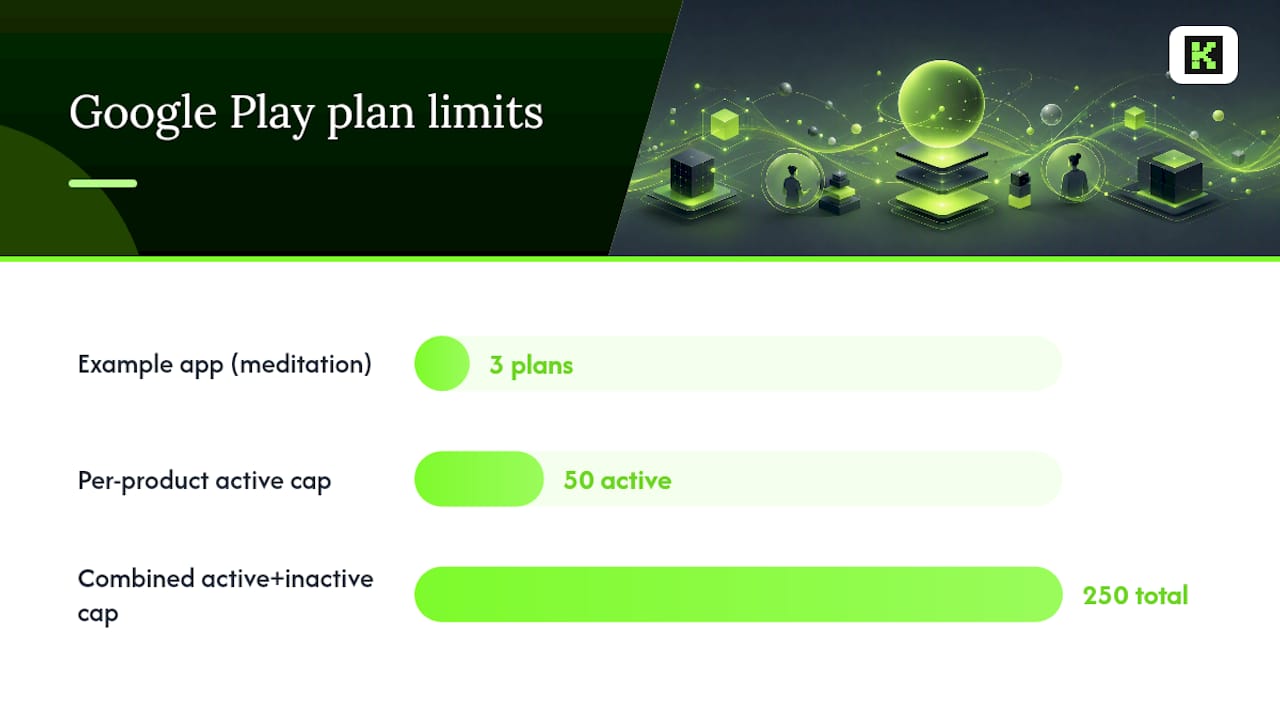
Catalog design isn't a cosmetic decision on Google Play. The console caps each subscription product at 50 active base plans and offers, with a combined limit of 250 active and inactive. Teams that spin up a new base plan for every regional promotion or seasonal sale burn through that limit fast, and once you hit it, you can't launch a new offer until you archive an old one. The smarter move: keep a lean set of base plans and rotate seasonal offers on top of them, since inactive plans still preserve historical analytics without eating into your active quota.
Practical points for the build:
- Integrate through the Play Billing Library, which handles the purchase flow, acknowledgment, and query APIs for current subscription state.
- Deep link users to the Play Store's subscription center from your app's settings screen rather than building a custom cancellation flow, since Google expects that path to stay native.
- When a user switches base plans mid-cycle, Google applies proration based on the replacement mode you configure. Modes range from immediate replacement with a prorated credit to deferred replacement that waits until the next renewal, and picking the wrong mode is a common source of billing complaints.
Pro Tip: Treat inactive base plans as reusable templates instead of deleting them after a promotion ends. You keep the analytics history intact and avoid quietly creeping toward the 250-plan ceiling with one-off offers you'll never reuse.
Subscription Lifecycle: What Backend Architecture Do You Need?
Relying on client-side checks alone will eventually cost you revenue. A user can cancel, get a refund, or hit a payment failure while the app is closed, and your backend has no way to know unless it's listening for it. Both platforms build this into their infrastructure through server-to-server messaging: Apple's App Store Server Notifications and Google's Real-Time Developer Notifications (RTDN). Server-to-server notifications are the reliable way to catch renewals, cancellations, and grace period transitions that a client-only integration will simply miss.
A working backend needs to track six core states for every active subscriber:
- Active — the subscription is current and the entitlement should be granted.
- Billing retry — a payment attempt failed and the platform is retrying automatically.
- Grace period — payment failed but the platform still grants entitlement temporarily while retries continue.
- Account hold — retries exhausted; the platform suspends entitlement but keeps the subscription record for potential recovery.
- Expired — the subscription has fully lapsed with no active billing relationship.
- Pending purchase — a transaction is initiated but not yet completed, common with delayed payment methods.
Each state needs a corresponding backend action, not just a database flag. A billing retry notification should trigger a gentle in-app or push reminder about the payment method. A move into grace period should keep the entitlement live but flag the account for a follow-up notice. An account hold notification should revoke access immediately and, ideally, trigger a win-back email rather than silence. Google's guidance on managing purchases covers the specific API calls for canceling, revoking, and refunding subscriptions server-side, which you'll need for support-driven refund requests as much as automated lifecycle events.
Three implementation practices separate a reliable subscription backend from one that quietly leaks revenue:
- Verify every receipt or purchase token server-side before granting an entitlement. Never trust a client-reported "purchase successful" flag on its own.
- Build idempotent notification handlers. Both platforms can and will redeliver the same notification, and a handler that double-processes a renewal will double-grant or double-charge internally.
- Log every state transition with a timestamp and source (notification vs. manual API call). When a user disputes a charge or claims lost access, that log is the only fast way to resolve it.
Pro Tip: Build a dead-letter queue for notification processing failures instead of letting a failed handler silently drop the event. A renewal notification you fail to process quietly is a subscriber you'll eventually lose without ever knowing why.
What's the Best UX for Managing Subscriptions In-App?
Users shouldn't have to guess where their subscription lives or what happens when they cancel. Put a Manage Subscription link inside account or settings, and wire it to a direct deep link into the platform's subscription center rather than a custom in-house cancellation screen. Deep linking to the platform's native subscription center meets both Apple's and Google's policy expectations and saves you from maintaining a parallel cancellation UI that has to stay in sync with two different billing systems.
Inside the app itself, show the subscriber three things without requiring a tap: current plan name, next renewal date, and the price they'll be charged. Ambiguity here is one of the most common drivers of chargeback disputes and one-star reviews, since users who can't easily check their status assume the worst about upcoming charges.
If you build any cancellation flow at all (even one that ultimately redirects to the platform), it should:
- Confirm the exact date access ends, not just "your subscription is canceled."
- Explain clearly that canceling stops future renewals but doesn't refund the current period.
- Optionally offer a single win-back incentive or a one-question exit survey before completing the flow, since this is your last real shot at retention.
Resubscribing deserves its own thought. Apple and Google both track whether a user has previously used a free trial or introductory offer tied to a subscription group or base plan, and they won't grant that same discounted offer twice to the same account. Design your resubscribe flow to check offer eligibility server-side before promising a returning user a trial they no longer qualify for.
Pro Tip: Never build a custom "are you sure?" cancellation gate that blocks the platform's native flow. Both Apple and Google review apps for exactly this pattern, and it's one of the faster ways to get a subscription-based app rejected.
How Do Trials, Offer Codes, and Regional Pricing Work?
Introductory offers are the single biggest lever for subscription conversion, and both platforms restrict them to keep the system from being gamed. Apple limits a user to one introductory offer or free trial per subscription group, ever, regardless of how many products sit inside that group. Google Play checks eligibility per base plan and offer combination, so a user who already used a trial on one base plan may still qualify for a different offer on another, depending on how you've configured eligibility.
Offer codes give you a way to distribute access outside the standard purchase flow. Apple supports one-time-use codes for individual redemptions (press outreach, customer support goodwill) and custom codes that a batch of users can redeem, useful for a marketing campaign with a shared promo string. Google Play configures equivalent promotional offers directly against a base plan, redeemable through a code or a targeted link.
Regional pricing isn't just currency conversion. Purchasing power varies enormously across territories, and both stores let you set distinct price points per region rather than applying one flat exchange rate. Scheduling a future price change is supported on both platforms, which matters if you're testing a price increase: Apple lets you schedule a single future price change and test its effect on upgrade and downgrade paths before it takes effect, rather than pushing an immediate change that surprises existing subscribers.
Worth testing deliberately rather than guessing at:
- Trial length (seven days versus fourteen versus thirty) against trial-to-paid conversion, not just signup volume.
- Introductory price discount depth against long-term retention, since a steep discount can attract price-sensitive users who churn the moment the full price kicks in.
- Promo code campaigns against actual paid conversion, not just redemption count.
Billing Edge Cases: Pending Transactions, Refunds, and Account Holds
Pending transactions happen when a payment method needs extra time to clear, common with certain regional payment types on Google Play and with some carrier billing setups. The correct move is usually to grant entitlement provisionally once the platform confirms the purchase is pending, then reconcile it when the final confirmation notification arrives. Denying access outright until full clearance creates a bad first impression for a subscriber who did everything right.
Grace periods and account holds exist specifically to reduce accidental churn from expired cards, not to punish users. During a grace period, keep the entitlement active while the platform retries billing in the background. Once the platform moves the subscriber into account hold, revoke access, since retries have been exhausted and there's no active billing relationship to justify continued entitlement. Reinstating access quickly and cleanly if the user updates their payment method is what separates a subscription service people trust from one they complain about publicly.
Refunds and revocations both remove entitlement, but they arrive through different channels and carry different implications:
- A refund typically comes from a support request the user filed directly with Apple or Google, and it triggers a notification you need to handle by immediately revoking access.
- A revocation can be platform-initiated (fraud, chargeback) or developer-initiated through the platform's management API, and it should be treated with the same urgency as a refund notification.
- Developer-initiated cancellation only stops future renewals; it does not refund or immediately end the current billing period unless you explicitly issue a refund alongside it.
Confusing "stop renewals" with "stop payment" is a common support escalation. A user who cancels expects access until their paid period ends, not immediate revocation, unless a refund was also processed.
How Do You Measure and Improve Subscription Performance?
Subscriptions live or die on a small set of metrics, and most teams either track too many vanity numbers or too few operational ones. In-app purchases and subscriptions represent a major and growing share of global app revenue, which means the difference between a mediocre and a strong subscription business usually comes down to disciplined measurement, not a fundamentally different product.
Five numbers matter more than the rest:
- MRR/ARR (monthly or annual recurring revenue) as your top-line health check.
- ARPU (average revenue per user) to catch pricing or tier mix problems before they show up in total revenue.
- Trial-to-paid conversion rate, segmented by trial length and acquisition channel.
- Churn by cohort, since blending all users into one churn number hides which acquisition source or price tier is actually leaking subscribers.
- LTV (lifetime value) to judge whether your acquisition spend is sustainable against what a subscriber actually generates.
Instrument every one of these events server-side, not just in a client analytics SDK: purchase, renewal, cancellation, refund, and entitlement grant/revoke. Combining store notifications with in-app analytics produces the most accurate subscription reporting, because store notifications catch the billing truth while in-app events capture the behavioral context around it, like which screen prompted the cancellation.
Once instrumentation is solid, run experiments that actually move a metric: A/B test trial length against paid conversion, test a win-back offer against churned-user reactivation rate, and test price tiers against net revenue rather than raw signup count. A cheaper tier that converts more trials but generates less ARPU isn't automatically a win.
Developer Launch Checklist for Subscriptions
- Configure every product in App Store Connect and Google Play Console, including subscription groups, levels, base plans, and territory price points.
- Implement StoreKit or the Play Billing Library purchase flows, then run full sandbox testing across trial, upgrade, downgrade, and cancellation paths.
- Enable server-to-server notifications on both platforms and verify receipts or purchase tokens server-side before granting entitlement.
- Add an in-app deep link to the native subscription management screen, instrument purchase and lifecycle analytics, and create dedicated sandbox test accounts on both platforms.
Teams that want to prototype this flow before committing engineering time can move faster by starting from an existing app shell. Kellosolutions's MVP builder is one way to get a testable subscription flow running quickly rather than building the scaffolding from zero.
What I've Learned Watching Subscription Launches Go Wrong
Most subscription bugs aren't billing bugs. They're entitlement bugs, where a team gets the StoreKit or Play Billing purchase flow working perfectly and then never builds the backend state machine to match it. The purchase succeeds, the receipt looks fine, and three weeks later a subscriber who canceled is still getting charged, or one who's current has lost access. That gap between "the payment worked" and "the entitlement is correct" is where almost every support ticket originates.
The systems can be built by teams with senior engineers on fixed-price contracts, which removes the guesswork of estimating backend lifecycle work as a vague line item. The MVP builder exists specifically for teams who want to test a subscription model before committing to a full build.
— Ints
Get Subscription Infrastructure Built Right the First Time
Building the entitlement logic, notification handlers, and cross-platform billing integration described here easily eats more engineering time than teams budget for, especially when App Store Connect and Play Console configuration turns out to need three rounds of fixes before sandbox testing passes clean. Such projects are often run with senior engineers only, on fixed prices agreed before work starts, with one accountable contact for the entire build instead of a shifting team.
If you're validating whether a subscription model fits your app at all, the MVP builder gets a testable version running fast, at a flat 89 EUR, before you commit to full backend architecture. If you already know the model works and need the App Store Connect setup, Play Console configuration, and server-to-server notification handling built and documented properly, Kellosolutions's development services cover mobile, backend, and the subscription logic that connects them. Reach out through the services page to scope the build and get a fixed delivery date before any code gets written.
Sources
- Auto‑renewable subscriptions — App Store — Apple Developer
- About subscriptions — Play Billing — Android Developers
FAQ
How Do I Cancel an In-App Purchase Subscription?
On iOS, go to Settings, tap your name, then Subscriptions, and select the one to cancel, or use the Manage Subscriptions link inside a well-built app. On Android, open the Play Store, tap your profile icon, go to Payments & subscriptions, then Subscriptions, and cancel from there. Canceling stops future renewals but doesn't end access before the current paid period expires.
How Do I Find My In-App Purchases?
On iOS, your purchase and subscription history lives under Settings > [your name] > Subscriptions, or in the App Store app under your account. On Android, the Play Store's Payments & subscriptions section under your profile lists every active and past subscription tied to your Google account.
Is an In-App Purchase Free?
Not by default. Some apps offer a free trial or an introductory price for a limited period before regular billing starts, but the underlying subscription itself carries a real charge once that period ends. Always check the price and renewal terms shown on the purchase screen before confirming, since both Apple and Google display this clearly at checkout.
How Am I Charged for In-App Purchases?
Charges go through the payment method linked to your Apple ID or Google account, not a card you enter inside the app itself. Auto-renewing subscriptions bill automatically at the start of each new period unless canceled beforehand, while prepaid subscriptions on Google Play charge once for a fixed term with no automatic renewal.
Recommended
- Apps for sale — built already, ready to buy
- Build an MVP in your browser
- PetCare | Daily Reminder
- SKIPO | QuitAlcohol
Created with BabyLoveGrowth to get recommended by Perplexity